
diados
Extension of the Day

diados

5.0 FREE
  • Screenshot 1

Description

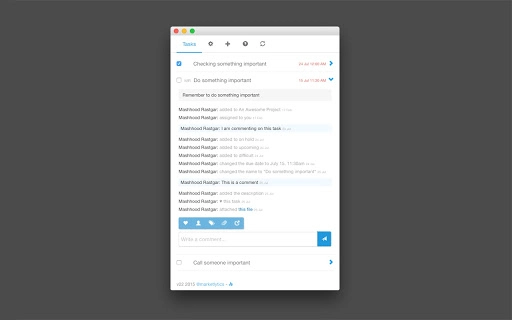
** Personal Access Tokens for Asana are supported! ** ** This application is now open source! Check it out at: https://github.com/marketlytics/chrome-asana-taskviewer ** This app is an offline task viewer for Asana (http://asana.com). Experience the native Asana experience from your desktop. It shows you the tasks including their details, allows you to mark them complete and comment + upload files to them. You can configure the workspace, project and do some basic filters and sorting. The app caches the tasks offline and also notifies you of changed tasks using the Chrome Notifications. You can now also add tasks to your projects. The main advantage of using this app is speed. With the global keyboard shortcut which can show / hide this app at any time + the ability to quickly switch between different projects and workspaces and view tasks offline, this is a must have solution for all Asana power users. The app has several additional configuration options including flexible resizing window, stay on top and disabling the auto update mode. Changelog: v24 - Branding update - Replaced API Key with Personal Access Token v23 - Bug fixes and minor enhancements v22 - Ability to add tasks (basic) - Show tags in task details - Can comment by pressing enter - Full names for comments and stories - Support for due time - Group by teams under the project selection

Guides & Tutorials for Asana Task Viewer App for Chrome

How to install Asana Task Viewer App for Chrome
  1. Click the Preview / Download button above.
  2. Once redirected, accept the terms and click Install.
  3. Wait for the Asana Task Viewer App for Chrome download to finish on your device.
How to use Asana Task Viewer App for Chrome

This software is primarily used for its core features described above. Open the app after installation to explore its capabilities.

User Reviews for Asana Task Viewer App for Chrome 0

    No reviews found

Similar Apps


